Archive for the ‘Computers’ Category

Monty Python Understands Government Bureaucracy

Tuesday, December 2nd, 2014

logo-blackSo I just got off the phone… for the third time… with Service Ontario, that wonderful branch of the Ontario Government responsible for mucking things up.  Back in the Spring/Summer we had fun with them in the renewal of our drivers licenses and health cards, but this time the episode revolves around the renewal of my wife’s Master Business License.

Cozy Cuddles Baby Products has been in business for 20 years and the bank has decided that NOW it wants to see her Master Business License.  Fortunately, I think, it was coming up for renewal in January, so I decided to renew the license for 5 years and request a copy of the MBL.  Since I was doing this online, I assumed I would be able to request a copy of the MBL via email (like any sane modern organization).  After all, this is what they said you could do. 

So back on Nov 4th I did the online renewal, paid my $60 and when the process was all done I realized that there had been no option to enter an email address or spot to download the MBL.  So I called. imageA nice lady on the phone explained to me that you can only receive the Master Business License if you are starting a NEW business.  For those of us who were renewing, it was only possible to receive the MBL via Snail Mail and that it should arrive in 2 to 3 weeks. I thanked her for supporting Canada Post and rural mail delivery 😛 and waited…. and waited….

Twenty four days went by before I called again to enquire as to the whereabouts of the hardcopy MBL.  Another nice young lady informed me that the renewal had been approved on Nov 5th and that the paperwork must be in the mail.  Now I can order electronic parts from China and have them delivered halfway around the world in 3 weeks or less, so I felt that maybe something might be amiss.  She assured me it had been sent and to give it little while longer and that if it didn’t arrive in the next week, to call back and they would email me a copy.

email-saidaonlineWAIT!  You can email me a copy?  You couldn’t do that on Nov 4th, you will be able to on Dec 2nd? Yes they could, but only if we’ve waited long enough for the mail to deliver the hard copy.  Please call back next week.

Today I called, sat on hold, and got another nice lady on the phone who assured me the hard copy had been mailed to the correct address and as much as implied it must be MY fault it hadn’t arrived.  *duh*  “Well, can it be resent via email?”  “Oh that’s a good idea” and she proceeded to take down my Cedar Valley address.  When she was all through she said, “So we will mail this out to … Oh wait!  You asked for that via email, didn’t you?”  (another *duh*).  After taking my email address (and having to spell it out to her three times) she told me it would arrive within 2 days and to call back if it didn’t.

So we’ll see if this one arrives. 
UPDATE: The Master Business License arrived via email the next day!!!

pythonBut this whole episode reminded both my wife and I *SO* much of the scene in Monty Python and the Holy Grail where the Father is trying to get the two guards to keep the Prince locked up in his room. 

According to this site (where you can read the script) it is listed as Scene 26, or you can watch the scene here (or below) with the specific part starting at about the 1:00 mark.

[tube]eVWH01E2weA[/tube]

You have to love the government bureaucracy!!

TTFN

Transcript…

FATHER:  Cut that out, cut that out.  Look, you’re marryin’ Princess Lucky, so you’d better get used to the idea. [smack]  Guards!  Make sure the Prince doesn’t leave this room until I come and get ‘im.

GUARD #1:  Not to leave the room even if you come and get him.

GUARD #2:  Hic!

FATHER:  No, no.  Until I come and get ‘im.

GUARD #1:  Until you come and get him, we’re not to enter the room.

FATHER:  No, no, no.  You stay in the room and make sure ‘e doesn’t leave.

GUARD #1:  And you’ll come and get him.

GUARD #2:  Hic!

FATHER:  Right.

GUARD #1:  We don’t need to do anything, apart from just stop him entering the room.

FATHER:  No, no.  Leaving the room.

GUARD #1:  Leaving the room, yes.

FATHER:  All right?

GUARD #1:  Right.  Oh, if-if-if, uh, if-if-if, uh, if-if-if we…

FATHER:  Yes, what is it?

GUARD #1:  Oh, if-if, oh–

FATHER:  Look, it’s quite simple.

GUARD #1:  Uh…

FATHER:  You just stay here, and make sure ‘e doesn’t leave the room. All right?

GUARD #2:  Hic!

FATHER:  Right.

GUARD #1:  Oh, I remember.  Uh, can he leave the room with us?

FATHER:  N- No no no.  You just keep him in here, and make sure–

GUARD #1:  Oh, yes, we’ll keep him in here, obviously.  But if he had to leave and we were–

FATHER:  No, no, just keep him in here–

GUARD #1:  Until you, or anyone else,–

FATHER:  No, not anyone else, just me–

GUARD #1:  Just you.

GUARD #2:  Hic!

FATHER:  Get back.

GUARD #1:  Get back.

FATHER:  Right?

GUARD #1:  Right, we’ll stay here until you get back.

FATHER:  And, uh, make sure he doesn’t leave.

GUARD #1:  What?

FATHER:  Make sure ‘e doesn’t leave.

GUARD #1:  The Prince?

FATHER:  Yes, make sure ‘e doesn’t leave.

GUARD #1:  Oh, yes, of course.  I thought you meant him.  Y’know, it seemed a bit daft, me havin’ to guard him when he’s a guard.

FATHER:  Is that clear?

GUARD #2:  Hic!

GUARD #1:  Oh, quite clear, no problems.

FATHER:  Right.  [starts to leave]  Where are you going?

GUARD #1:  We’re coming with you.

FATHER:  No no, I want you to stay ‘ere and make sure ‘e doesn’t leave.

GUARD #1:  Oh, I see.  Right. HERBERT:  But, Father!

FATHER:  Shut your noise, you!  And get that suit on!  And no singing!

GUARD #2:  Hic!

FATHER:  Oh, go get a glass of water.

TTFN … Again…

That’s What Customer Service SHOULD Be Like ALL The Time!!

Saturday, September 15th, 2012

Over the summer I started using my iPad to store and display my chord charts for the worship songs I play / lead in church.  It means I no longer have to fumble with paper on a Sunday morning (or while playing around during the week) and it means I always have nearly all my song charts with me all the time.  To do this, I use an app called OnSong which I highly recommend.

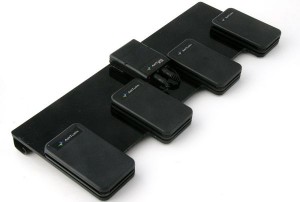
Now to make the page turns/scrolling easier I bought a wireless Bluetooth pedal system that connects to my iPad.  With it, I can do all sorts of things, but I’ve set it up for scrolling forward and backward, and for going to the next and previous songs.  The one that I use is the AirTurnBT-105 on Pedal Board with 4 ATFS-2 Pedals“.

When I originally bought the system from a company here in Canada, the product actually had a defective 1st pedal.  I contacted the company I bought from AND the manufacturer (AirTurn) and AirTurn got back to me within a couple of hours and within a few emails back and forth they ended up sending me a brand new system from their offices Colorado.  The new system actually incorporated some new design elements that made it more reliable.  The service was great!!

Now, this week, when I was using the system, I realized that the battery wasn’t charging.  I thought I’d email them just to see if they had any suggestions on how to revive the battery and to see if I was doing anything wrong.  Within 10 minutes the co-founder and VP of the company (yeah, it’s just a small company) got back to me with a suggestion and asked me to let him know what happened this morning (Saturday morning!).

Well, I tried his suggestion and it didn’t work, so at about 7:30am EDT I emailed him to let him know that it still didn’t seem to be charging.  His response — about 30 seconds later — was, “Okay, we’ll replace it then.”  No questions about what I’d done to screw it up.  No trying to get out of anything.  Heck, I didn’t even ASK to have it replaced!  I just wanted to know if there was anything *I* could do to revive it.  (It seems to still function as long as it’s plugged in, so I just figured I’d have to live with it that way from now on!)

So often these days Customer Service people seem to more of a filter.  Their job descriptions seems to be “Do everything you can to make sure that we (the company) don’t get blamed for anything and just save us money.”  This has been a great Customer Service experience.  I wish more companies were like this!

In the meantime, if you’re a worship leader, or in a band where you need music, or you just like to tinker with stuff, BOTH these products — OnSong and the AirTurn pedals — and ones you should look into.  I can’t recommend either product more highly!!

TTFN

YouVersion – Rare Opportunity to Download NIV & NLT This Weekend

Thursday, October 27th, 2011

I got this email this morning from the folks at YouVersion – a Bible software system for your iPhone/iPod touch, iPad, Android, or BlackBerry.

Some users recently lost earlier offline Bible versions they had downloaded to their mobile device* when they updated the Bible App. To help these users out, Biblica, Zondervan, and Tyndale—publishers of the NIV (New International Version) and NLT (New Living Translation)—graciously agreed to allow YouVersion to provide a 48-hour window during which they could download these versions again.

Please mark your calendar, and don’t miss this opportunity!

Sunday, October 30, 12:00 AM Central Time U.S. (GMT -5) to
Monday, October 31, 11:59 PM Central Time U.S. (GMT -5)

A big thank you goes out to these YouVersion partners for making these versions available for download again. And it’s not likely that YouVersion will be able to offer these versions in this way again anytime soon, so if you’ve ever wanted to download either one, this may be your only chance.

Also, just so you know: Several other Bible publishers generously offer their versions for free to the YouVersion community for download—all the time. Check the list of available versions on your device right now to see which ones you want to download!

Click the link for your device below for detailed instructions on how to download free versions:

*What does downloading mean? Many versions in the Bible App are available for you to store directly on your mobile device. When you download a version, you can read it literally anytime, anyplace—even when you can’t connect to your service provider or to the Internet.

Thank you,
The YouVersion Team
Facebook: http://facebook.com/YouVersion
Twitter: http://twitter.com/YouVersion

YouVersion is a great piece of software!  We were even at a church last Sunday where the congregation was encouraged to follow the sermon notes on their mobile devices using links in YouVersion!!

If you haven’t checked it out, then you should!  Especially this weekend!!!

And now we return you to our regular programming 🙂

TTFN

We’re Now Mobile Compatible

Thursday, October 14th, 2010

By popular request, Murray’s Musings is now compatible with mobile devices like smart phones, Blackberry’s or iPhones.  The site should automatically detect if you’re browsing from a mobile device and change the theme accordingly.

Now, I can’t verify that ALL functions and features will work, but hey, you’re not paying me anything anyway, so what do you want 🙂  (If something does break, then I’d love to know about it though for future reference and to see if we can fix it up!)

TTFN!

Tools and Tips

Wednesday, October 13th, 2010

In case any of you care, I’ve started a page here on my blog that lists the tools that I use both at home and at work for various tasks.  This will be on ongoing list (I hope), but since I get asked a lot about tools to do certain things, I thought it would be good to post my list. You can find the list from the Tools & Tips page which is located through the menu above, or this link… https://murray.thelahnfamily.com/tools-tips/.

I hope you find it useful.

Facebook took a hit yesterday

Friday, September 24th, 2010

Yesterday afternoon, Facebook took a hit. It went down for about 2.5 to 3 hours. Panic ensued in the streets. Or at least you’d think so from all the Twitter traffic ranting and raving about it.

This morning, I came across an article on MSNBC (see here for the full details. The journalist (Athima Chansanchai) excerpts some very funny Tweets that people posted. Here’s a few of them (read the full article for the whole (well, not the whole) list)…

  • @joeschmitt: “Either Facebook is down or Mark Zuckerberg just set everything to PRIVATE.”
  • @TheDollSays: “Facebook users are roaming the streets in tears, shoving photos of themselves in people’s faces and screaming, ‘DO YOU LIKE THIS? DO YOU?’”
  • @alqaeda: “#facebook is down. Not sure if we did that, but we should claim credit anyway. Hitting the infidels where it hurts, etc.”
  • @OPB: “BREAKING NEWS: Facebook is down. Worker productivity rises. U.S. climbs out of recession.”
  • @Emilburp: “When Twitter’s down, everyone Facebooks it. When Facebook’s down, everyone Tweets it. When Myspace’s down, no one cares.”
  • @IceNinjaSquad: “Facebook was down and 500 million users were forced to talk to their friends face to face. It was horrible.”

It sure makes for an intesting social experiment, doesn’t it.  Can we actually exist without our Social Networking sites anymore?

Ah computers.  Love em, or hate em.  They’re here to stay.

TTFN!